Model Auditor
Audit & PurgeKiểm toán toàn diện sức khỏe mô hình BIM với thang điểm 0-100% dựa trên 17 chỉ số BEP. Tích hợp quản lý cảnh báo (Warnings), Smart Purge quét 25 danh mục rác và Advanced Purge loại bỏ an toàn các view không tham chiếu và family không sử dụng.
Quick Workflow
Khởi chạy Model Auditor từ panel Standards & Settings trên ribbon.
Hệ thống tự động chạy chẩn đoán sức khỏe (Health Score) và so sánh xu hướng với lần quét trước.
Chuyển sang tab Warnings để gom nhóm, khoanh vùng phần tử và giải quyết các cảnh báo trùng lặp.
Vào Smart Purge để chọn lọc xóa các danh mục rác (Unused Line Styles, Materials, Fill Patterns...).
Xuất báo cáo kiểm toán chi tiết sang file Excel (.xlsx) để phục vụ họp phối hợp BIM.
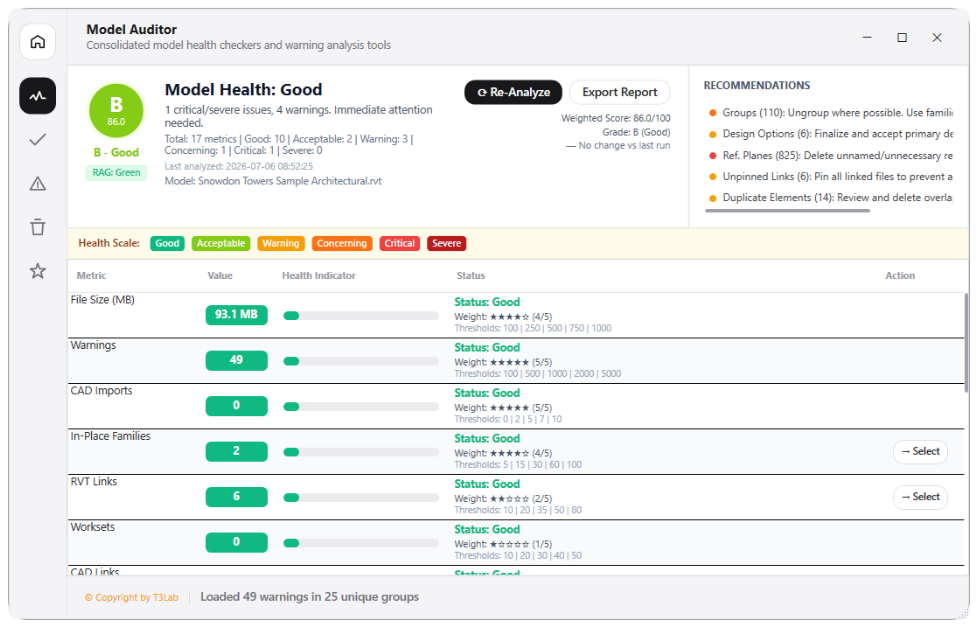
Interface Preview
Detailed Documentation
Model Auditor - User Guide & Reference
The Model Auditor utility (Audit category) Performs deep model quality checkups and health diagnostics. Evaluates file size (MB), active Revit warnings, CAD imports vs. links, in-place families count, Revit link footprint, worksets density, unused views and sheets, unnamed reference planes, detail lines, filled regions, and unplaced rooms. Calculates a weighted model health score and provides actionable recommendations to optimize performance..
1. Overview & Key Capabilities
The Model Auditor tool is designed to improve workflow efficiency by automating standard tasks. Key capabilities include:
- Performs deep model quality checkups and health diagnostics.
- Evaluates file size (MB), active Revit warnings, CAD imports vs.
- links, in-place families count, Revit link footprint, worksets density, unused views and sheets, unnamed reference planes, detail lines, filled regions, and unplaced rooms.
- Calculates a weighted model health score and provides actionable recommendations to optimize performance.
2. Detailed Step-by-Step Usage
Follow these instructions to use the tool in your active Revit session:
- Open the Model Auditor dashboard from the Standards & Settings ribbon panel.
- Configure audit metrics, thresholds, and weighting scales (or load standard templates like full BEP check or model performance).
- Select check categories: clean purge filters, active warning inspection, family size footprints, or in-place model instances.
- Click Run Audit to execute background diagnostics.
- Review the generated interactive dashboard showing the health score, warning groupings, and specific recommendations.
- Export the final audit summary to an Excel (.xlsx) file or HTML report for project coordination.
3. Technical Specifications & Under the Hood
Revit API Integration
- Key API Components: Revit Warnings API (
doc.GetWarnings()),PerformanceAdviserchecks, andFilteredElementCollectorfor in-place components and empty views/sheets verification. - Transaction Handling: All modifications are packaged into a single Revit API transaction. If any error occurs, the changes are rolled back automatically to preserve model integrity.
[!TIP] Best Practice Tip: Regularly running the Model Auditor prevents performance degradation. Large numbers of warnings and in-place families will slow down model opening and sync times.