Annotation Manager
BIM ProUnified Dimension and Text Note Manager. Standardizes typography, scans for orphaned tags, converts formatting (UPPERCASE), and handles dimension value overrides.
Quick Workflow
Launch Annotation Manager to open the tabbed management panel.
On Dimensions tab, audit styles and auto-rename types according to ISO 19650 rules.
On Text Notes tab, search text instances and inline-edit strings or convert to UPPERCASE.
Use Tag Checker to scan for orphaned tags missing host elements and batch-delete them.
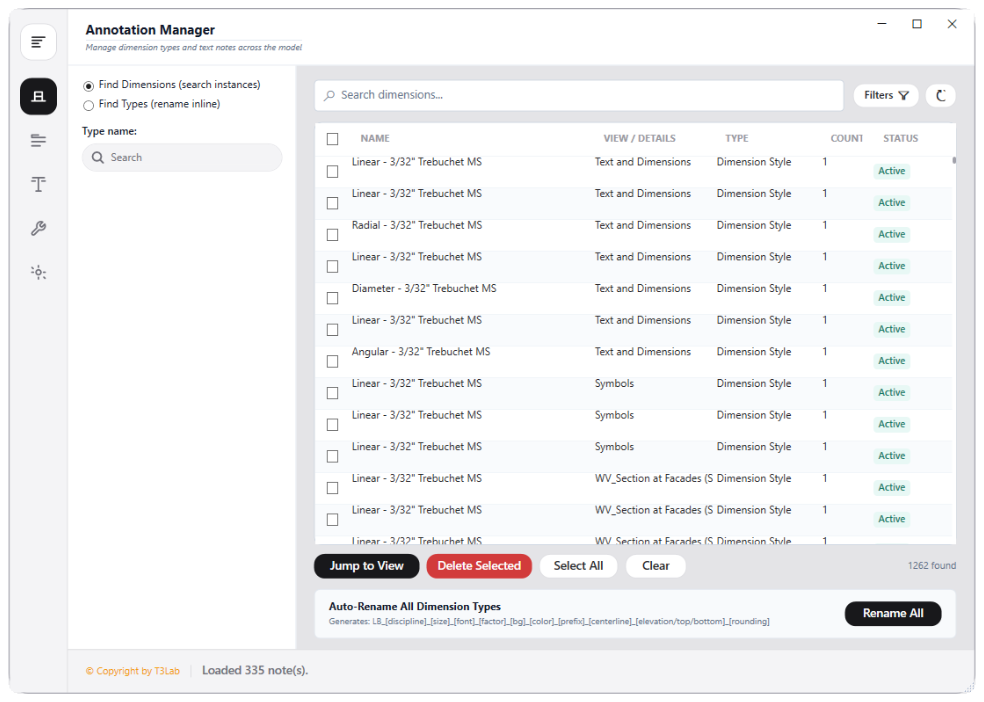
Interface Preview
Detailed Documentation
Annotation Manager - User Guide & Reference
The Annotation Manager utility (BIM Pro category) Unified Annotation and Text Note Manager. Consolidates dimension style audits, text notes inspections, orphaned tag auditing, and text overrides. Reads text sizes, fonts, width scales, and backgrounds, auto-renames styles according to ISO 19650 coding conventions, batch-corrects formatting (e.g. UPPERCASE conversion), and handles dimension value overrides..
1. Overview & Key Capabilities
The Annotation Manager tool is designed to improve workflow efficiency by automating standard tasks. Key capabilities include:
- Unified Annotation and Text Note Manager.
- Consolidates dimension style audits, text notes inspections, orphaned tag auditing, and text overrides.
- Reads text sizes, fonts, width scales, and backgrounds, auto-renames styles according to ISO 19650 coding conventions, batch-corrects formatting (e.g.
- UPPERCASE conversion), and handles dimension value overrides.
2. Detailed Step-by-Step Usage
Follow these instructions to use the tool in your active Revit session:
- Launch Annotation Manager to open the main tabbed panel.
- On the Dimensions tab, review styling parameters (Size, Font, Width Scale, Color) and auto-rename types to follow standard naming rules.
- On the Text Notes tab, type keywords to search text content across all active instances, double-click name cells to edit inline, and click jump to view.
- Use Tag Checker to scan the active document for orphaned tags with missing host elements, and batch-delete them.
- Use DimText tool to apply overrides (Value, Above, Below, Prefix, Suffix) across multiple dimensions.
- Use Utilities to convert text notes to UPPERCASE or renumber elements sequentially along a spline.
3. Technical Specifications & Under the Hood
Revit API Integration
- Key API Components:
TextNoteandDimensionStyleproperties auditing, ISO 19650 coding rules checks, and document transaction loops for renaming/formatting notes. - Transaction Handling: All modifications are packaged into a single Revit API transaction. If any error occurs, the changes are rolled back automatically to preserve model integrity.
[!TIP] Best Practice Tip: Audit dimension overrides to verify that drafting teams are not manually rewriting dimensions to cover up modeling inaccuracies.