Visual & Style Manager
StylesUnified styling and graphic overrides manager. Controls fill patterns, line patterns, projection/cut styles, and integrates the Color Splasher module to visually audit parameter values.
Quick Workflow
Open Visual & Style Manager from the ribbon.
Under Color Splasher, select a target Revit category and parameter (e.g., Wall Fire Rating).
Click Load to group elements by values and preview generated color palettes.
Click Apply Overrides to color-code active views, or Create Legend to generate a drafting sheet legend.
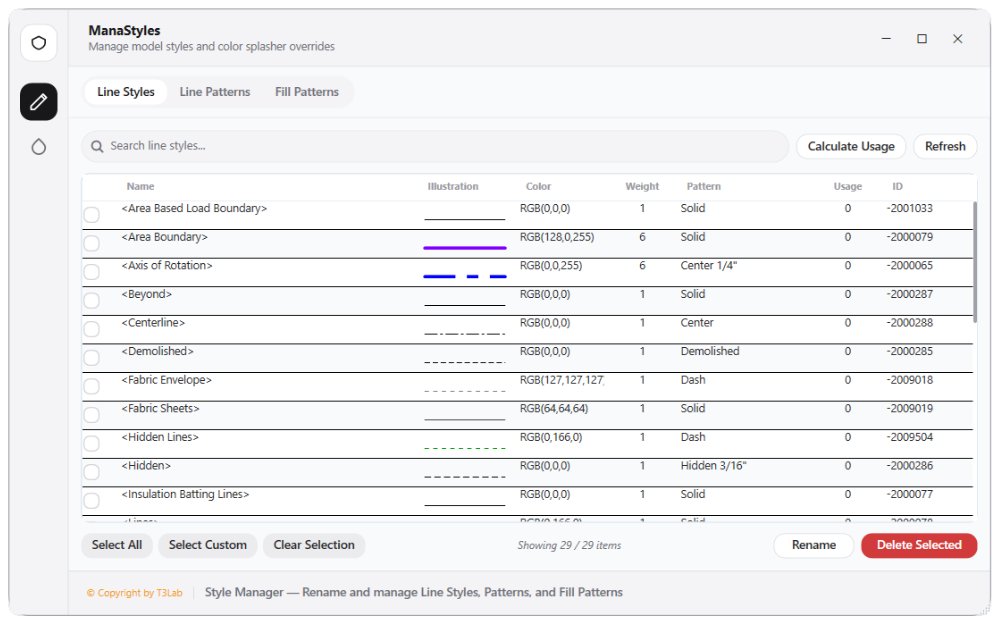
Interface Preview
Detailed Documentation
Visual & Style Manager - User Guide & Reference
The Visual & Style Manager utility (Styles category) Consolidated styling and graphic overrides manager. Controls fill patterns (drafting vs. model targets, crosshatching grid counts), line patterns, and projection/cut styles. Integrates the Color Splasher module to query elements by category parameters, automatically generate unique color palettes, override model graphics in the active view, create visual color swatches legends, or apply view filter configurations..
1. Overview & Key Capabilities
The Visual & Style Manager tool is designed to improve workflow efficiency by automating standard tasks. Key capabilities include:
- Consolidated styling and graphic overrides manager.
- Controls fill patterns (drafting vs.
- model targets, crosshatching grid counts), line patterns, and projection/cut styles.
- Integrates the Color Splasher module to query elements by category parameters, automatically generate unique color palettes, override model graphics in the active view, create visual color swatches legends, or apply view filter configurations.
2. Detailed Step-by-Step Usage
Follow these instructions to use the tool in your active Revit session:
- Open the Visual & Style Manager.
- Select the target tab: Fill Patterns, Line Patterns, Line Styles, or Color Splasher.
- Under Color Splasher, select a target Revit category and parameter (e.g. Wall Fire Rating or Door Width).
- Click Load to query elements and group them by parameter values (showing value counts and generating color codes).
- Click Apply Overrides to color-code elements in the active view, or click Create Legend to generate a drafting sheet legend containing colored swatches.
- Click Create View Filters to register standard ParameterFilterElement overrides to the active view.
3. Technical Specifications & Under the Hood
Revit API Integration
- Key API Components:
OverrideGraphicSettingsassignments, active view override mapping (view.SetElementOverrides), and standard Category graphics style definition. - Transaction Handling: All modifications are packaged into a single Revit API transaction. If any error occurs, the changes are rolled back automatically to preserve model integrity.
[!TIP] Best Practice Tip: Apply style overrides temporarily using the view override overrides or view filters to preserve central model graphic standards.