Workset Manager
WorksetsRule-based workset assignment and organization utility. Automates bulk creation of standardized worksets from text lists and generates isolated 3D isometric views for each workset.
Quick Workflow
Launch Workset Manager (verifies worksharing status on the active project).
Under Bulk tab, import a standard workset configuration list and click Create from List.
Click Remove Unused to safely purge empty worksets from the model.
Navigate to Views tab and click Create Dedicated Views to generate isolated 3D views per workset.
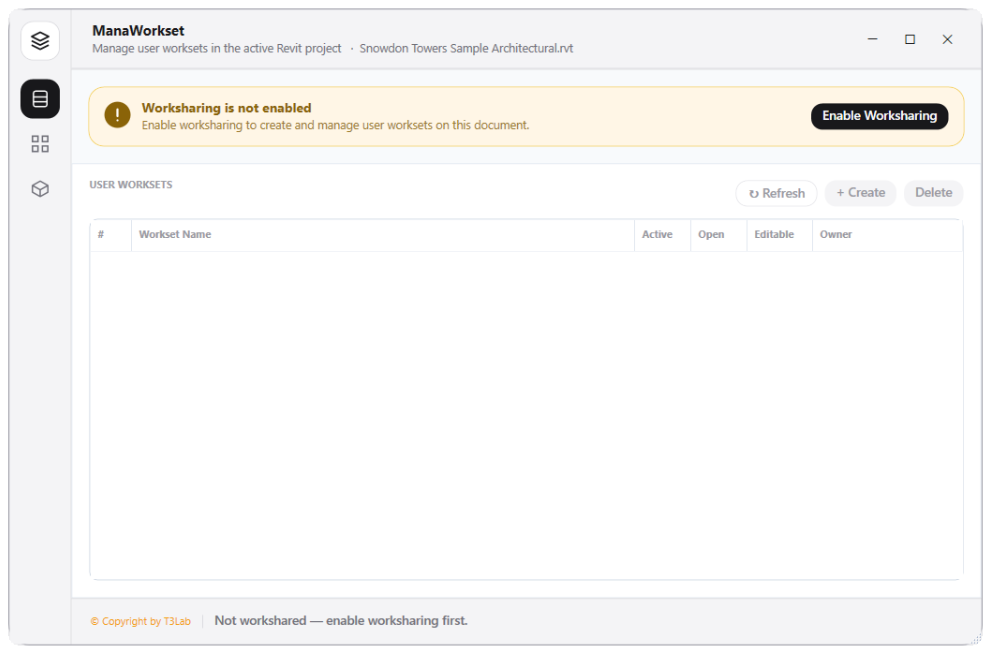
Interface Preview
Detailed Documentation
Workset Manager - User Guide & Reference
The Workset Manager utility (Worksets category) Rule-based workset assignment and organization utility. Evaluates user worksets, verifies worksharing state, and automates bulk creation of standardized worksets from configuration text files (workset_list.txt). Includes a dedicated 3D view creator that automatically isolates worksets by building separate isometric 3D views for each workset..
1. Overview & Key Capabilities
The Workset Manager tool is designed to improve workflow efficiency by automating standard tasks. Key capabilities include:
- Rule-based workset assignment and organization utility.
- Evaluates user worksets, verifies worksharing state, and automates bulk creation of standardized worksets from configuration text files (workset_list.txt).
- Includes a dedicated 3D view creator that automatically isolates worksets by building separate isometric 3D views for each workset.
2. Detailed Step-by-Step Usage
Follow these instructions to use the tool in your active Revit session:
- Launch Workset Manager (checks if worksharing is active on the current document).
- Browse active worksets in the DataGrid showing their open status, editability, and owner.
- Under the Bulk tab, import a standardized txt file and click Create from List to batch-create worksets.
- Click Remove Unused to purge empty worksets from the model.
- Navigate to the Views tab, select worksets, and click Create Dedicated Views to generate 3D isometric views showing only elements in the respective workset.
3. Technical Specifications & Under the Hood
Revit API Integration
- Key API Components:
WorksetTableandWorksetCollectorparsing, workshared check (doc.IsWorkshared), and customFilteredWorksetCollector3D view visibility filters. - Transaction Handling: All modifications are packaged into a single Revit API transaction. If any error occurs, the changes are rolled back automatically to preserve model integrity.
[!TIP] Best Practice Tip: Assigning elements to dedicated worksets based on discipline improves model load speeds when opening selected worksets.