Feedback
SupportCửa sổ gửi ý kiến đóng góp, báo cáo lỗi và đề xuất tính năng mới trực tiếp tới đội ngũ phát triển T3Lab. Tự động đính kèm thông tin phiên bản Revit, build number và ngữ cảnh tài liệu.
Quick Workflow
Bấm Send Feedback từ stack Assistant Tools.
Chọn loại phản hồi (Báo lỗi / Gợi ý tính năng / Hỏi đáp).
Nhập nội dung tin nhắn và bấm Send Mail để gửi thư có sẵn tiêu đề chuẩn hóa tới nhóm phát triển.
Interface Preview
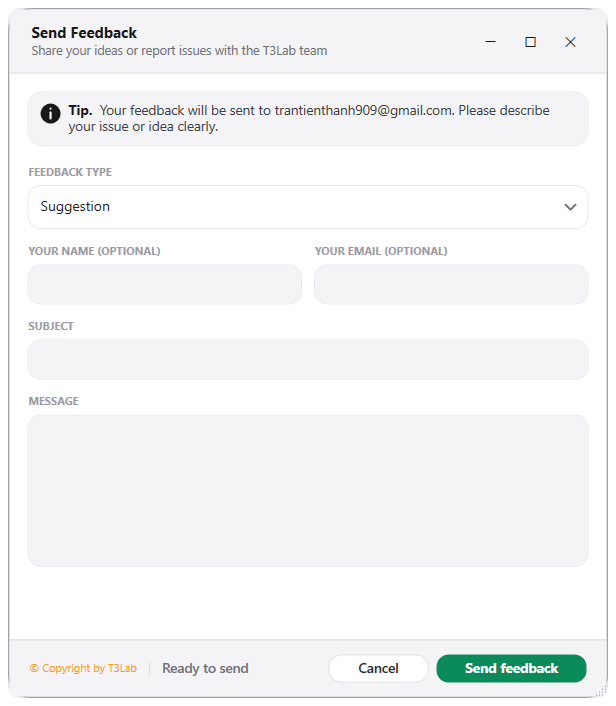
Detailed Documentation
Feedback - User Guide & Reference
The Feedback utility (Support category) Feedback and documentation hub..
1. Overview & Key Capabilities
The Feedback tool is designed to improve workflow efficiency by automating standard tasks. Key capabilities include:
- Feedback and documentation hub.
2. Detailed Step-by-Step Usage
Follow these instructions to use the tool in your active Revit session:
- Click to open bug reports, documentation, or suggestion forms.
3. Technical Specifications & Under the Hood
Revit API Integration
- Key API Components: Documentation hub and issues submission gateway.
- Transaction Handling: All modifications are packaged into a single Revit API transaction. If any error occurs, the changes are rolled back automatically to preserve model integrity.
[!TIP] Best Practice Tip: Use the feedback form to submit bug reports along with the system log files generated in the temporary folder.