T3Lab Handbook
T3LAB.REVIT
PDF import
PDF ImportNhập tuần tự các trang bản vẽ từ tệp PDF nhiều trang vào các view Revit được chọn theo độ phân giải cao (150 / 300 / 600 DPI).
Ribbon:Support
Safety:Atomic Transaction
Revit:2020 – 2026
Quick Workflow
01
Bấm PDF Import trên panel Support.
02
Chọn file PDF cần chèn và độ phân giải mong muốn.
03
Chọn các View đích trong dự án và bấm Import.
Interface Preview
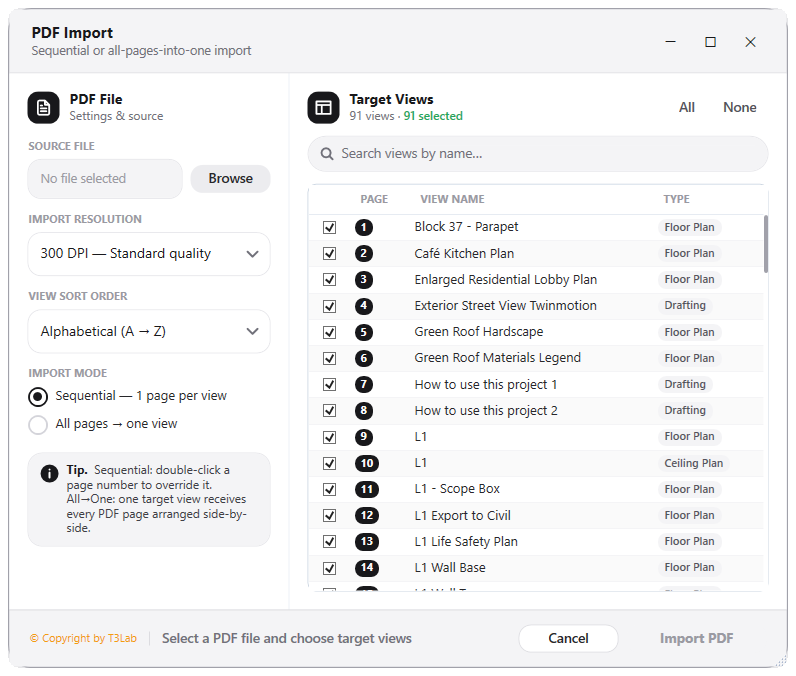
PDF Multi-Page Sequential ImporterClick to enlarge ↗
Detailed Documentation
PDF Import - User Guide & Reference
The PDF Import utility (CAD category) Imports multiple PDF pages into Revit views sequentially..
1. Overview & Key Capabilities
The PDF Import tool is designed to improve workflow efficiency by automating standard tasks. Key capabilities include:
- Imports multiple PDF pages into Revit views sequentially.
2. Detailed Step-by-Step Usage
Follow these instructions to use the tool in your active Revit session:
- Select a PDF file, specify pages and destination views, click import.
3. Technical Specifications & Under the Hood
Revit API Integration
- Key API Components:
ImportInstanceandCADLinkTypeauditing. Collects external file paths and view specific placement records in the model database. - Transaction Handling: All modifications are packaged into a single Revit API transaction. If any error occurs, the changes are rolled back automatically to preserve model integrity.
[!TIP] Best Practice Tip: Avoid imported CAD instances. Always link CAD files instead of importing them, as imports bloat the file size and corrupt styling variables.