Ribbon Names
UI CustomRút gọn tên các panel và tab trên thanh Ribbon Revit theo bộ từ điển mapping tùy chỉnh của người dùng, giúp tránh tình trạng thanh công cụ bị tràn màn hình.
Quick Workflow
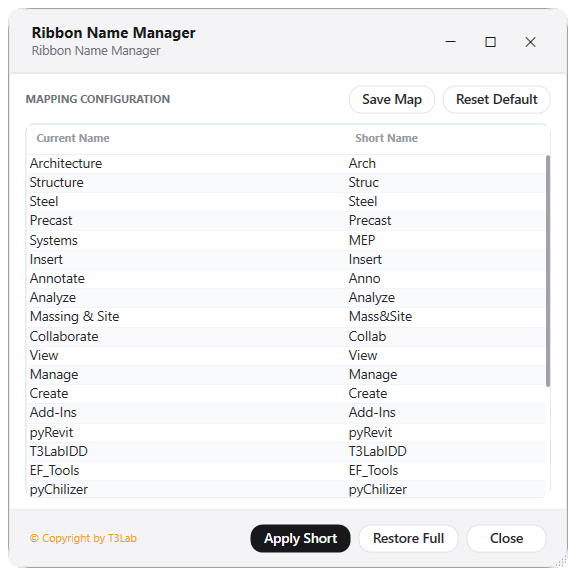
Khởi chạy Ribbon Names, nhấp đúp vào ô tên rút gọn (Short Name) để chỉnh sửa.
Bấm "Apply Short" để áp dụng tên ngắn, hoặc "Restore Full" để khôi phục tên gốc.
Bấm "Save Map" để lưu thiết lập cho các phiên làm việc sau.
Interface Preview
Detailed Documentation
Ribbon Names - User Guide & Reference
The Ribbon Names utility (UI Custom category) Shortens Revit panel header names to save ribbon screen space..
1. Overview & Key Capabilities
The Ribbon Names tool is designed to improve workflow efficiency by automating standard tasks. Key capabilities include:
- Shortens Revit panel header names to save ribbon screen space.
2. Detailed Step-by-Step Usage
Follow these instructions to use the tool in your active Revit session:
- Check panels to shorten, click apply to rename ribbon panels.
3. Technical Specifications & Under the Hood
Revit API Integration
- Key API Components: Revit ribbon tab controls visibility manipulation, customization of header titles, and custom grey/dark themed active view templates.
- Transaction Handling: All modifications are packaged into a single Revit API transaction. If any error occurs, the changes are rolled back automatically to preserve model integrity.
[!TIP] Best Practice Tip: Minimize ribbon cluster by turning off third-party tabs you don't active use. This frees up screen space on smaller monitors.