Containment Finder
BIM ProSpatial containment auditor. Identifies all furniture, equipment, and architectural fixtures located inside each room boundary and writes room data into elements.
Quick Workflow
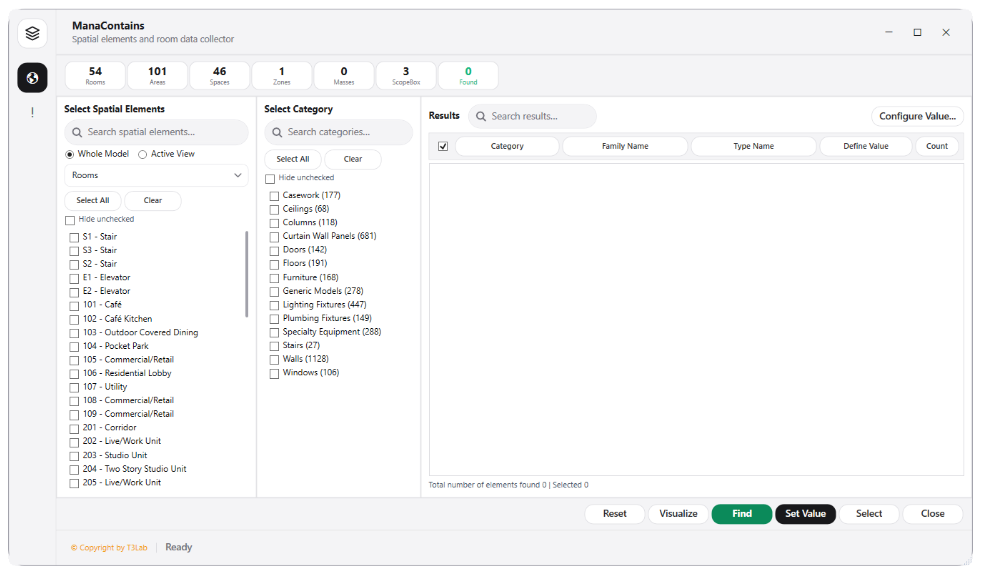
Select target rooms or spaces to analyze.
Run containment scan (evaluates 3D spatial boundary intersections).
Review catalog of elements grouped per room and sync room parameters.
Interface Preview
Detailed Documentation
Containment Finder - User Guide & Reference
The Containment Finder utility (BIM Pro category) Room containment auditor and spatial data collector. Analyzes architectural, structural, and MEP elements placed inside room boundaries, and catalogs their parameters relative to their host rooms..
1. Overview & Key Capabilities
The Containment Finder tool is designed to improve workflow efficiency by automating standard tasks. Key capabilities include:
- Room containment auditor and spatial data collector.
- Analyzes architectural, structural, and MEP elements placed inside room boundaries, and catalogs their parameters relative to their host rooms.
2. Detailed Step-by-Step Usage
Follow these instructions to use the tool in your active Revit session:
- Select rooms or spaces to analyze.
- Run containment scan (evaluates SpatialElementBoundaryOptions).
- Review lists of elements inside each room (e.g. doors, furniture, lighting).
- Sync room parameters to element parameters if needed.
3. Technical Specifications & Under the Hood
Revit API Integration
- Key API Components:
TextNoteandDimensionStyleproperties auditing, ISO 19650 coding rules checks, and document transaction loops for renaming/formatting notes. - Transaction Handling: All modifications are packaged into a single Revit API transaction. If any error occurs, the changes are rolled back automatically to preserve model integrity.
[!TIP] Best Practice Tip: Audit dimension overrides to verify that drafting teams are not manually rewriting dimensions to cover up modeling inaccuracies.