Schedule Manager
ExcelSchedule Export/Import Pro. Coordinates Revit schedules with Excel spreadsheets, allowing parameter bulk edits in Excel with two-way synchronization.
Quick Workflow
Launch Schedule Manager and select target Revit schedule.
Click Export to Excel and update parameter values in spreadsheet.
Click Import Excel to synchronize edited data back into Revit elements.
Interface Preview
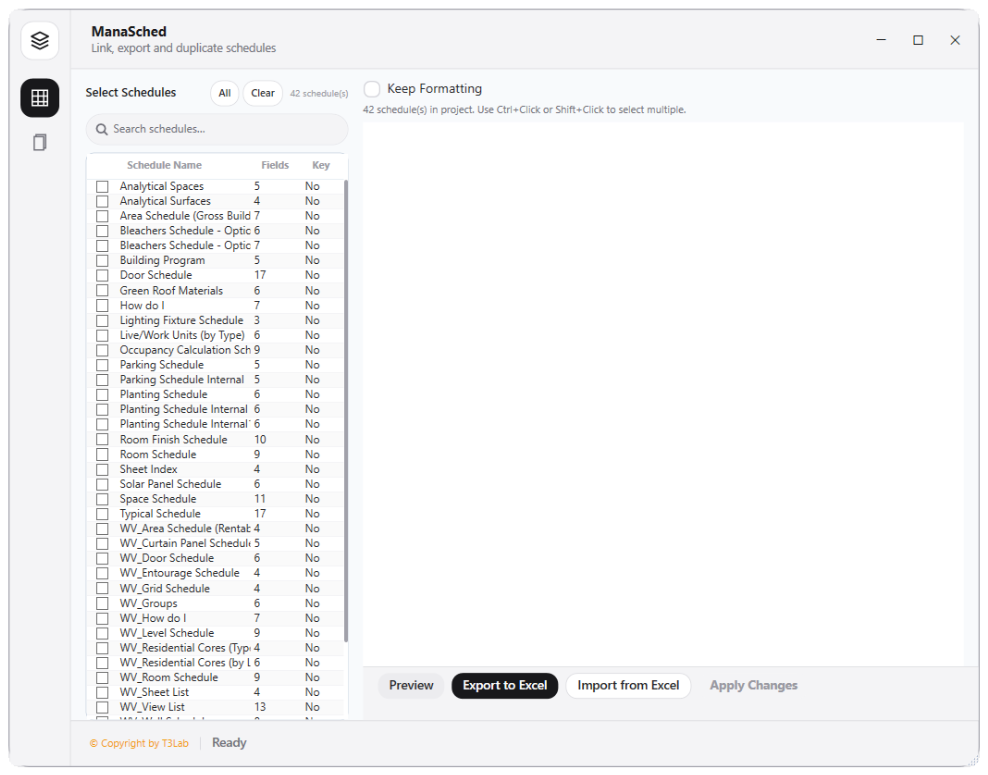
Detailed Documentation
Schedule Manager - User Guide & Reference
The Schedule Manager utility (Excel category) Schedule Export/Import Pro and Schedule Copy. Coordinates Revit schedules with Excel spreadsheets, letting users export schedules, modify parameters in Excel, and import spreadsheet data back to update Revit elements in bulk..
1. Overview & Key Capabilities
The Schedule Manager tool is designed to improve workflow efficiency by automating standard tasks. Key capabilities include:
- Schedule Export/Import Pro and Schedule Copy.
- Coordinates Revit schedules with Excel spreadsheets, letting users export schedules, modify parameters in Excel, and import spreadsheet data back to update Revit elements in bulk.
2. Detailed Step-by-Step Usage
Follow these instructions to use the tool in your active Revit session:
- Launch Schedule Manager.
- Select the target Revit schedule from the list.
- Click Export to Excel and open the spreadsheet.
- Modify parameter values in Excel columns.
- Save and click Import Excel in Schedule Manager to update elements.
3. Technical Specifications & Under the Hood
Revit API Integration
- Key API Components:
ViewSchedulecell data extraction, Excel interop parsing, and bulk element modification transactions from spreadsheet inputs. - Transaction Handling: All modifications are packaged into a single Revit API transaction. If any error occurs, the changes are rolled back automatically to preserve model integrity.
[!TIP] Best Practice Tip: Export schedules to Excel for vendor data entry (e.g. ironmongery specifications), then import them back to update Revit instances in bulk.