IFC-SG Suite
RegulatorySingapore BCA IFC-SG compliance auditor. Injects required shared parameters, assigns regulatory subtypes, and verifies compliance scoring before export.
Quick Workflow
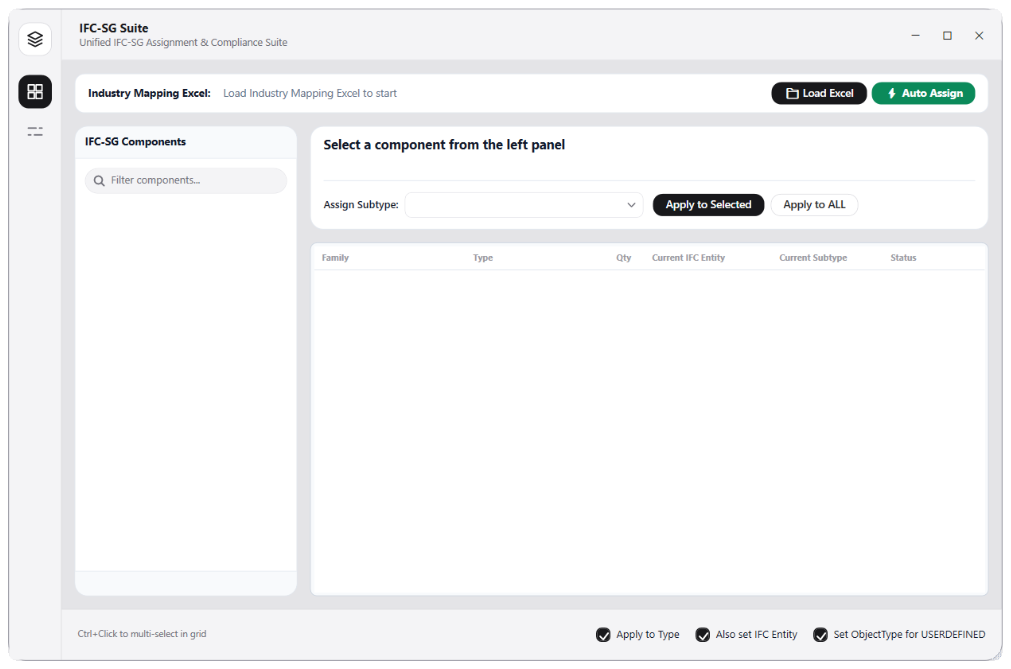
Open IFC-SG Suite from the Data panel.
Click Parameter Loader to inject BCA Singapore IFC-SG shared parameters.
Use Subtype Definer to map categories to required IFC-SG subtypes.
Click Run Checker to view compliance dashboard and highlight missing elements.
Interface Preview
Detailed Documentation
IFC-SG Suite - User Guide & Reference
The IFC-SG Suite utility (Regulatory category) Regulatory submission compliance auditor for Singapore BCA IFC-SG. Loads required shared parameters, automatically assigns subtypes to Revit categories, and audits parameter completeness before exporting the final IFC model. Displays interactive compliance dashboards (OK, partial, missing) and lets users select failed elements..
1. Overview & Key Capabilities
The IFC-SG Suite tool is designed to improve workflow efficiency by automating standard tasks. Key capabilities include:
- Regulatory submission compliance auditor for Singapore BCA IFC-SG.
- Loads required shared parameters, automatically assigns subtypes to Revit categories, and audits parameter completeness before exporting the final IFC model.
- Displays interactive compliance dashboards (OK, partial, missing) and lets users select failed elements.
2. Detailed Step-by-Step Usage
Follow these instructions to use the tool in your active Revit session:
- Open IFC-SG Suite.
- Click Parameter Loader to inject BCA Singapore IFC-SG shared parameters into target categories.
- Use Subtype Definer to map elements to regulatory subtypes (e.g. Wall to IfcWallStandardCase).
- Click Run Checker to audit parameter completeness.
- Review compliance scores (%) per category. Click Select on failed categories to highlight elements missing parameters in Revit.
- Export compliance reports to Excel.
3. Technical Specifications & Under the Hood
Revit API Integration
- Key API Components: Shared parameter injection, IFC export classifications (
IfcRegistry), compliance checks per category properties against BCA schemas. - Transaction Handling: All modifications are packaged into a single Revit API transaction. If any error occurs, the changes are rolled back automatically to preserve model integrity.
[!TIP] Best Practice Tip: Run parameter checklist audits before exporting IFC files to ensure your Singapore BCA IFC-SG regulatory submissions pass validation.