T3Lab Handbook
T3LAB.REVIT
Tab Manager
UI CustomManages ribbon tab visibility to hide cluttered third-party addin tabs and streamline your Revit workspace.
Ribbon:Support
Safety:Atomic Transaction
Revit:2020 – 2026
Quick Workflow
01
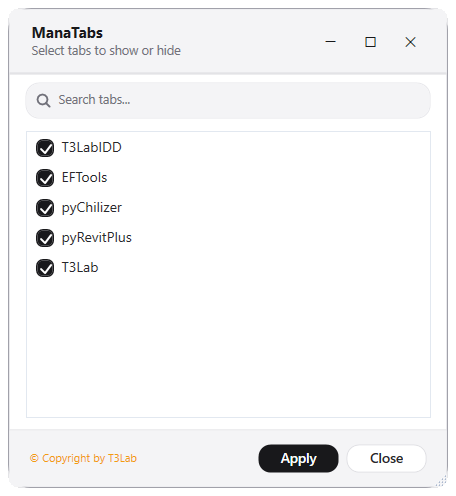
Open Tab Manager and review checklist of installed ribbon tabs.
02
Uncheck third-party tabs you do not use regularly and click Apply.
Interface Preview
Detailed Documentation
Tab Manager - User Guide & Reference
The Tab Manager utility (UI Custom category) Manages ribbon tabs visibility to simplify the workspace..
1. Overview & Key Capabilities
The Tab Manager tool is designed to improve workflow efficiency by automating standard tasks. Key capabilities include:
- Manages ribbon tabs visibility to simplify the workspace.
2. Detailed Step-by-Step Usage
Follow these instructions to use the tool in your active Revit session:
- Select third-party tabs in the checklists, click apply to hide or restore them.
3. Technical Specifications & Under the Hood
Revit API Integration
- Key API Components: Revit ribbon tab controls visibility manipulation, customization of header titles, and custom grey/dark themed active view templates.
- Transaction Handling: All modifications are packaged into a single Revit API transaction. If any error occurs, the changes are rolled back automatically to preserve model integrity.
[!TIP] Best Practice Tip: Minimize ribbon cluster by turning off third-party tabs you don't active use. This frees up screen space on smaller monitors.