Text to Element
Data TransferQuét các Text Note trên view và tự động ghi nội dung chữ vào tham số của đối tượng nằm bên dưới dựa trên thuật toán giao cắt Bounding Box.
Quick Workflow
Mở view có chứa các ghi chú Text Note (ví dụ: ghi chú mã cửa, ký hiệu hoàn thiện).
Chạy Text to Element và chọn tham số mục tiêu cần ghi giá trị (ví dụ: Comments, Mark).
Bấm Process để công cụ tự động gán dữ liệu trên toàn view mà không cần chọn thủ công.
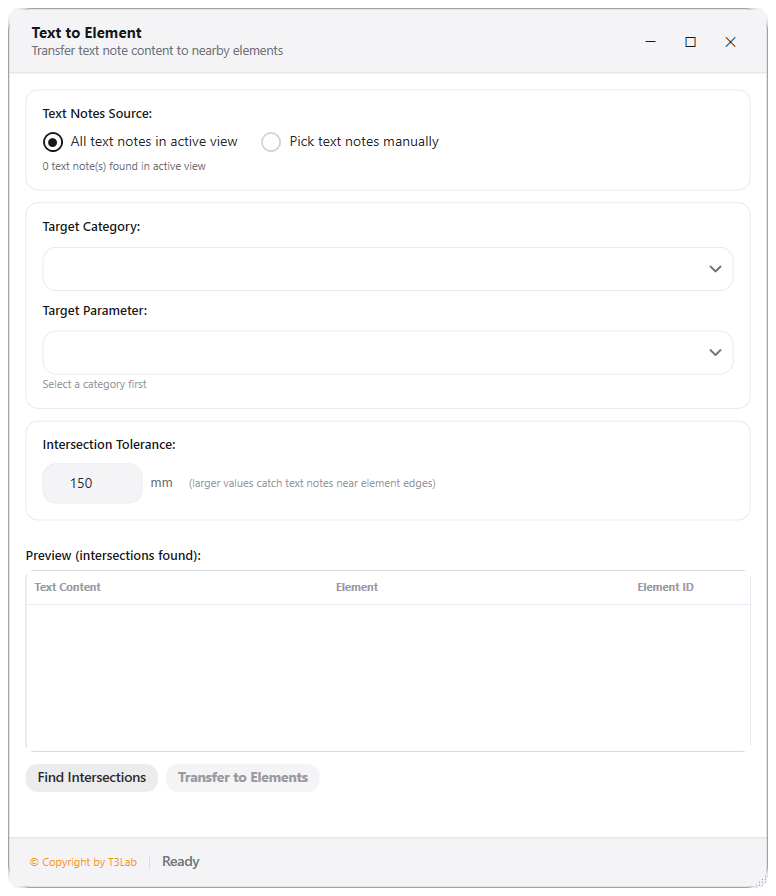
Interface Preview
Detailed Documentation
Text to Element - User Guide & Reference
The Text to Element utility (Parameters category) Transfers text note contents to Revit element parameters based on physical boundary overlap in the active view. Ideal for mapping annotation tags or CAD text block values directly to Revit families..
1. Overview & Key Capabilities
The Text to Element tool is designed to improve workflow efficiency by automating standard tasks. Key capabilities include:
- Transfers text note contents to Revit element parameters based on physical boundary overlap in the active view.
- Ideal for mapping annotation tags or CAD text block values directly to Revit families.
2. Detailed Step-by-Step Usage
Follow these instructions to use the tool in your active Revit session:
- Open Text to Element dialog.
- Select source Text Notes and choose target elements category (e.g., Mechanical Equipment).
- Select target parameter (e.g., Mark, Comments, or shared parameter).
- Click Find Intersections to view overlaps (Text Note bounding boxes intersecting elements).
- Review matches in the preview grid.
- Click Write Values to transfer text data to Revit parameters.
3. Technical Specifications & Under the Hood
Revit API Integration
- Key API Components:
Parameterretrieval and value assignment (parameter.Set()), mapping spatial bounds intersections (BoundingBoxIsWithinfilters). - Transaction Handling: All modifications are packaged into a single Revit API transaction. If any error occurs, the changes are rolled back automatically to preserve model integrity.
[!TIP] Best Practice Tip: Use this to map room parameter values to the equipment contained inside. Double check that shared parameters are loaded.